
POS Staff Management: 8 Ways to Track Performance & Simplify Payroll
POS Staff Management: 8 Ways to Track Performance & Simplify Payroll
Introduction: From Owner Anxiety to Operational Control
As a business owner, you constantly juggle a dozen pressing questions. Are my staff productive during their shifts? Is the payroll I'm running 100% accurate? Am I losing money to honest mistakes or, worse, deliberate theft? These anxieties are common, but they don't have to be your reality. The solution is likely already sitting on your counter: your Point of Sale (POS) system.
Most owners see their POS as just a digital cash register, but it's a powerful operations hub. It holds the key to transforming your staff management from a source of stress into a streamlined, data-driven process. This guide will show you 8 specific ways a modern POS system can save you time, reduce costs, and foster greater employee accountability in your small business.
1. Create Unquestionable Accountability with Unique Staff Logins
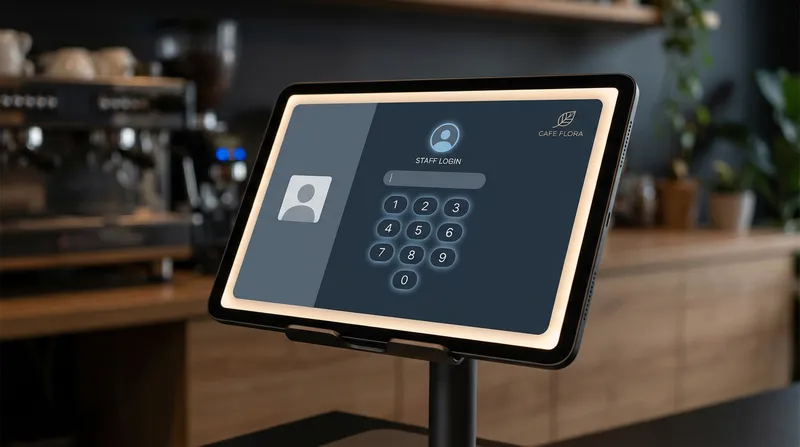
The single most important feature for effective staff management is assigning every employee a unique login, usually a simple PIN. This one feature is the foundation for almost all other tracking capabilities. When every transaction, order void, discount, and refund is tied directly to a specific staff member, it creates a powerful layer of transparency.
This accountability naturally discourages unauthorized actions. When staff know their actions are logged, they are more careful and conscious of following procedures. Considering that industry groups like the National Restaurant Association estimate employee theft can account for up to 4% of a restaurant's annual sales, this first line of defence is not just helpful—it's essential for protecting your bottom line.
Use Role-Based Access to Protect Your Business
Unique logins also enable role-based access control, allowing you to set different permission levels for each staff member. This isn't about micromanagement; it's about empowering your team within safe boundaries. You can configure your POS so that:
- Cashiers can process sales and take payments but cannot issue refunds over $20 or change menu prices.
- Shift Managers can approve voids, process larger refunds, and view end-of-day reports.
- Owners have unrestricted access to all data, settings, and reports.
This ensures that sensitive functions are protected without creating bottlenecks in your daily operations.
Note: Lazygrid's Lite plan includes 1 main account, the Standard plan adds 2 sub-accounts, and the Premium plan includes 4 sub-accounts to support teams of any size.
2. Simplify Payroll & Prevent Time Theft with an Integrated Time Clock
Are you still relying on manual paper timesheets or a separate punch-clock system? These methods are prone to errors, guesswork, and deliberate manipulation. A POS with a built-in digital time clock eliminates these problems entirely.
Staff clock in and out for their shifts and breaks directly on the POS terminal. The system records these times to the second, creating a precise, indisputable record. This prevents common issues like "buddy punching" (where one employee clocks in for another) and inaccurate rounding of hours. You only pay for the exact time worked, which can lead to significant savings on your labour bill. More importantly, it ensures you are compliant with local labour laws. In New Zealand, for example, the Employment Relations Act mandates that employers keep complete and accurate time and payroll records.
3. Track Key Sales Metrics to Identify Top Performers
Managing staff isn't just about tracking their hours; it's about understanding their impact. A modern POS shifts the focus from simple attendance to valuable output by tracking key performance indicators (KPIs) for each employee. You can instantly see who your star players are by looking at data like:
- Total sales per shift
- Sales per hour
- Average transaction value
- Number of items per order
- Upsells of specific promotional items
This data provides a fair and objective way to evaluate performance, moving you beyond gut feelings. According to Harvard Business Review, tracking performance and providing feedback is directly linked to higher employee engagement and better business outcomes. This data is also invaluable for identifying your most loyal customers and deciding who to reward through your customer loyalty program.
4. Create Data-Driven Staff Incentive Programs
Once you can identify your top performers, you can reward them. The performance data from your POS is the perfect foundation for building effective and fair staff incentive programmes that boost morale and drive sales.
Instead of a subjective 'Employee of the Month' award, you can create data-driven contests that motivate the whole team. For example:
- For a cafe: Offer a bonus to the barista with the highest average transaction value, encouraging them to upsell pastries or larger coffee sizes.
- For a restaurant: Create a team-based reward for selling the most of a new dessert special, fostering healthy competition and collaboration.
- For a retail shop: Reward the staff member who signs up the most customers for your loyalty programme.
Pro Tip: Gamify Performance. Display a leaderboard in your staff area showing progress toward a team goal. Friendly competition motivates teams and makes performance tracking feel like recognition, not surveillance.
These programmes show your team that you recognise and value their hard work, motivating everyone to contribute directly to your business goals.
5. Optimise Labour Costs with Smart Scheduling
Overstaffing during quiet periods eats into your profits, while understaffing during a rush leads to lost sales and unhappy customers. Your POS sales data is the key to solving this puzzle.
By analysing your sales reports by the hour and day of the week, you can clearly see your peak and slow periods. This allows you to build smarter, more efficient staff schedules. You can stop guessing and start scheduling staff precisely when you need them. With labour costs being a top concern for most operators, as noted by Restaurant Business Magazine, using data to optimise scheduling is a powerful strategy for controlling your biggest expense. This also helps you improve efficiency during busy times, a topic we cover in our post on how to increase table turnover rate.
6. Pinpoint and Provide Targeted Staff Training
POS reports can also highlight areas where staff might be struggling and need support. If you notice one employee consistently has a lower average transaction value or is slower at processing orders, it's not a reason for punishment—it's an opportunity for supportive, targeted training.
This is especially powerful during onboarding. New staff can review their own performance reports, helping them understand expectations and track their improvement over their first few weeks. Perhaps a new cafe employee isn't selling the new seasonal drink because they haven't tasted it yet. This data allows you to intervene early and provide the specific help they need to succeed. Research in the Journal of Retailing and Consumer Services supports that technology can be leveraged to improve employee productivity and service quality, and this is a perfect example.
7. Streamline End-of-Day Cash Reconciliation
For many businesses, cashing up at the end of the day is a time-consuming and often frustrating process. A modern POS with individual staff tills makes this process quick and painless.
At the end of a shift, you can run a report that shows exactly how much cash, EFTPOS, and other payments each employee is responsible for. The process becomes a simple matter of counting the cash in their drawer and comparing it to the report. Any discrepancies are identified immediately and tied to a specific individual, making it easy to address the issue on the spot. For restaurants with table service, this also makes tip distribution transparent and fair, as you can see exactly which server handled which tables and their corresponding sales. This can reduce your end-of-day closing procedures by 15-30 minutes every single day.
8. Manage Your Teams Across Multiple Locations Seamlessly
If you own multiple cafes, food trucks, or shops, a cloud-based POS system is a game-changer. Instead of trying to manage each location in a silo, you get a centralised dashboard to oversee your entire operation.
From your phone or laptop, you can view and compare sales, monitor staff performance, and check time clock data for all your locations in real-time. This allows you to maintain consistent standards, identify which locations need more support, and manage your whole business without having to be physically present everywhere. This aligns with advice from the SBA on the importance of having clear financial oversight as you grow. Keeping up with technology is key for multi-location management, as highlighted in our look at 2025 POS trends.
Conclusion: Your POS Is More Than a Till—It's Your Operations Partner
As we've seen, a modern POS does so much more than just process payments. It's a comprehensive tool that brings clarity, accountability, and efficiency to every aspect of staff management. From creating individual accountability and simplifying payroll to optimising labour costs and managing multiple locations, your POS system gives you the data and control you need to run your business with confidence.
By leveraging these eight features, you can transform your POS from a simple till into your most trusted operations partner. This investment gives you the peace of mind that comes from knowing your business is running smoothly, your team is supported, and your bottom line is protected.
Ready to bring this level of accountability and efficiency to your team? Start your free 14-day trial of Lazygrid POS today — no credit card required, and see how these features can transform your operations in less than a week.
Frequently Asked Questions
What is the single most important POS feature for managing staff?
While many features are valuable, the absolute foundation of good POS staff management is unique staff logins. This simple feature enables individual accountability for every transaction, provides the framework for secure role-based access, and ensures you have clean, reliable data for all other performance tracking and reporting.
Can a POS system really prevent employee time theft?
Yes, it is a powerful tool for prevention. An integrated digital time clock eliminates manual entry errors and common issues like 'buddy punching'. As the nonprofit SCORE advises, directly connecting timekeeping with payroll provides a strong incentive for accuracy, removing both the opportunity and the motivation for time theft.
How do I track employee performance without creating a 'micromanagement' culture?
The key is to frame the data as a tool for positive reinforcement and support. Use the reports to publicly praise top performers, create fun team-based incentives, and identify opportunities for supportive training, not to punish staff for minor issues. When your team sees that the goal is to help everyone succeed, it fosters a culture of growth, not fear.
Is it difficult to switch from manual timesheets to a POS time clock?
No, it's a significant simplification that saves hours of administrative work. The transition is seamless for staff, who simply clock in and out on the same terminal they use for orders. The POS calculates the hours automatically, allowing you to generate a perfect payroll report in seconds and eliminating manual data entry and calculation errors for good.
I have two cafes. Can I manage staff schedules and performance for both from one system?
Absolutely. This is a core benefit of modern, cloud-based POS systems. From a single dashboard on your laptop or phone, you can access real-time sales data, compare location performance, monitor staff hours, and manage schedules for all your sites. It gives you a complete operational overview without needing to travel between locations.